


- The 5 best AI coding tools in 2026 include Copilot, Cursor, Claude, Tabnine, and Windsurf.
- While Cursor excels at deep codebase understanding and daily coding, Claude works best for reasoning and complex multi-file refactoring.
- Selecting the right AI coding assistant tool involves assessing your current infrastructure, security requirements, and your team's skills.
For startup founders and engineering leads, the promise of AI is about survival. In a landscape where time-to-market is everything, the ability to ship clean, scalable code faster than the competition is a massive advantage. However, the market is flooded with options, making an AI coding assistant tools comparison essential for decision-makers who can't afford to waste time on the wrong tech stack.
We understand that you need a robust tool that integrates with professional workflows, understands complex architectures, and doesn't introduce massive technical debt. The goal of this article is to help you choose the best AI coding assistant for your specific needs, whether you are optimizing an existing product or scaling a growing team.
Best AI Coding Assistant Tools in 2026
The following tools have defined the development landscape in 2026. Each brings a different philosophy to the table, from deep IDE integration to autonomous agentic capabilities.
1. GitHub Copilot

GitHub Copilot remains the elephant in the room and arguably the best AI for coding for teams deeply embedded in the Microsoft and GitHub ecosystem. As the pioneer of the category, it has matured from a simple autocomplete engine into a comprehensive platform.
Key features of GitHub Copilot:
- Copilot Workspace: A "task-centric" environment that allows developers to go from a GitHub Issue to a Pull Request in a streamlined workflow.
- Multi-model choice: As of late 2024, GitHub began allowing users to toggle between models like GPT-4o, Claude 3.5 Sonnet, and Gemini 1.5 Pro within Copilot Chat.
Strengths of GitHub Copilot:
- Unmatched integration with GitHub Enterprise, decent security compliance, and a massive user base.
- The "Edits" feature now allows for multi-file changes, though it is less aggressive than Cursor’s Composer.
Weaknesses of GitHub Copilot:
- Copilot often suggests code that looks correct but has subtle bugs, outdated APIs, or security flaws
- It can sometimes struggle with deep context awareness across very large, monolithic codebases compared to newer, native AI editors.
Pricing:
- Free - $0/user/month
- Team - $4/user/month
- Enterprise - $21/user/month
Best Use Cases:
Enterprise teams requiring strict compliance, organizations already using GitHub for CI/CD, and developers who want a "set it and forget it" integration in VS Code or Visual Studio.
2. Cursor
Cursor has rapidly become one of the top AI coding assistants by reimagining the IDE itself. Forked from VS Code, it is an AI-native editor rather than just a plugin.
Key features of Cursor:
- Composer: A powerful "agent" mode that can write code across multiple files simultaneously. For example, it can add a “Delete” button to the frontend and update the API endpoint to handle the request.
- Tab prediction: It predicts your next edit (diff), not just the next few words, making refactoring incredibly fast.
- Local indexing: It indexes your local codebase using embeddings to provide superior RAG (Retrieval-Augmented Generation) responses.
Strengths of Cursor:
- It feels "native" to the coding process.
- The "Shadow Workspace" allows the AI to run linter checks on its own-generated code before showing it to you.
Weaknesses of Cursor:
- Cursor sometimes loses track of context during long sessions or when switching between files/projects.
- Cursor relies on cloud-based AI models, which means sensitive or proprietary code must be sent externally for processing. This is a potential risk for companies with strong privacy and compliance requirements.
Pricing:
- Hobby - $0/month
- Pro - $20/month
- Pro+ - $60/month
- Ultra - $200/month
Best use cases:
Startups and power users who want the absolute fastest coding experience and are willing to switch editors to get it.
3. Claude (and Claude Code)

While Claude is a general LLM, Anthropic’s "Claude Code" (a terminal-based agent) has emerged as a distinct powerhouse.
Key features of Claude:
- Claude Code (CLI): A terminal tool that acts as an autonomous agent. You can authorize it to run commands, edit files, and run tests independently.
- Thinking Models: Powered by the Claude 3.7 Sonnet (and newer) models, it offers arguably the best reasoning capabilities for complex refactoring.
Strengths of Claude:
- It excels at "thinking" through architectural changes.
- Unlike autocomplete tools, it can take a vague instruction like "Refactor the auth module to use JWTs" and execute a plan across 20 files.
Weaknesses of Claude:
- As a CLI tool, it lacks the inline "flow" of an IDE-based assistant unless paired with a plugin. It is meant for "delegation", not "completion".
Pricing:
- Free - $0/month
- Pro - $17/month
- Max - $100/month or $200/month
Best Use Cases:
Complex refactoring, architectural planning, and debugging difficult logic errors where deep reasoning beats speed.
Read also: Modernizing Legacy Systems With an AI-Assisted Approach
4. Tabnine
Tabnine positions itself as the privacy-centric best AI coding assistant for strict enterprise environments.
Key features of Tabnine:
- Air-gapped deployment: It can be deployed entirely on-premise or in a VPC, ensuring code never leaves your network.
- Context awareness: It uses a specialized "Context Engine" that connects to your repositories and Jira tickets without exposing data to public models.
Strengths of Tabnine:
- It offers robust self-hosted options.
- It guarantees that your code is not used to train public models.
Weaknesses of Tabnine:
- It may sometimes feel less "creative" than GPT-5 or Claude-based tools when generating boilerplate from scratch.
- The free tier was largely sunsetted for professional features in 2025.
Pricing:
- The Tabnine Agentic Platform - $59/user/month (annual subscription)
Best Use Cases:
Fintech, healthcare, and defense startups where data privacy and IP protection are non-negotiable.
Read also: How to Make Your App HIPAA-Compliant
5. Windsurf

A newer entrant from Codeium, Windsurf is an "agentic IDE" that competes directly with Cursor.
Key features of Windsurf:
- Cascade: Their answer to Cursor's Composer, a flow that combines deep context awareness with agentic action.
- Supercomplete: An autocomplete that predicts your intent, like adding a necessary import statement automatically when you use a new library.
Strengths of Windsurf:
- It features "Flows" that allow the AI to maintain context over long development sessions, acting more like a pair programmer that remembers your history than a stateless bot.
Weaknesses of Windsurf:
- As a newer tool, it has a smaller plugin ecosystem and community support than other AI assistants.
Pricing:
- Free - $0/month
- Pro - $15/month
- Teams - $20/month
- Enterprise - custom
Best Use Cases:
Developers looking for a Cursor alternative with a different approach to context management and "deep work" flows.

Cursor vs Copilot vs Claude: Brief Comparison
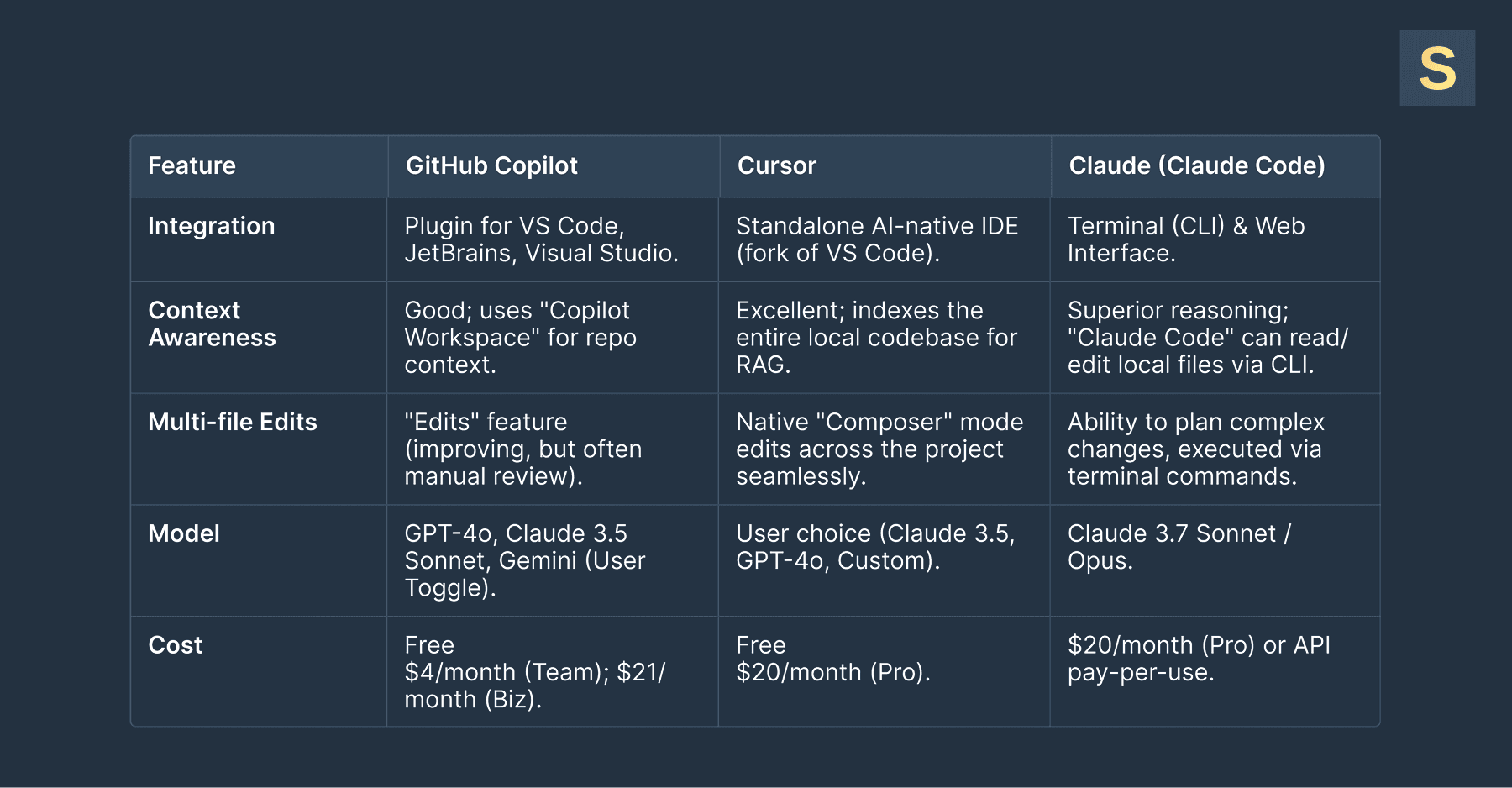
When talking about AI coding assistant tools, the three names that come up most often in professional circles are Cursor, GitHub Copilot, and Claude. To help you navigate the Сursor vs Copilot vs Claude debate, we have broken down their key differences in the table below.
The "Cursor vs Copilot" Dynamic
The Cursor vs Copilot decision usually comes down to friction versus power. Copilot is lower friction. You install it, and it works. Cursor requires migration but offers a higher ceiling for productivity because the AI can "see" and "touch" your entire project structure more effectively.
The "Claude Code vs Cursor" Dynamic
In the Claude Code vs Cursor comparison, the distinction is interaction style:
- Cursor is for "flow state" coding: fast, inline edits while you type.
- Claude Code (the CLI tool) is for "delegation": you tell it to "refactor the auth module to use JWT," and it executes a plan in your terminal.
Many developers actually use both: Cursor for writing and Claude for thinking. At Seedium, we use Claude, Cursor, and GitHub Copilot depending on project requirements and use cases. In our approach, we carefully research each project to determine what tasks can be optimized for speed and efficiency before introducing any AI automation. As a result, this helps streamline software development by 30-40%.
How to Choose the Best AI Coding Assistant for Your Project
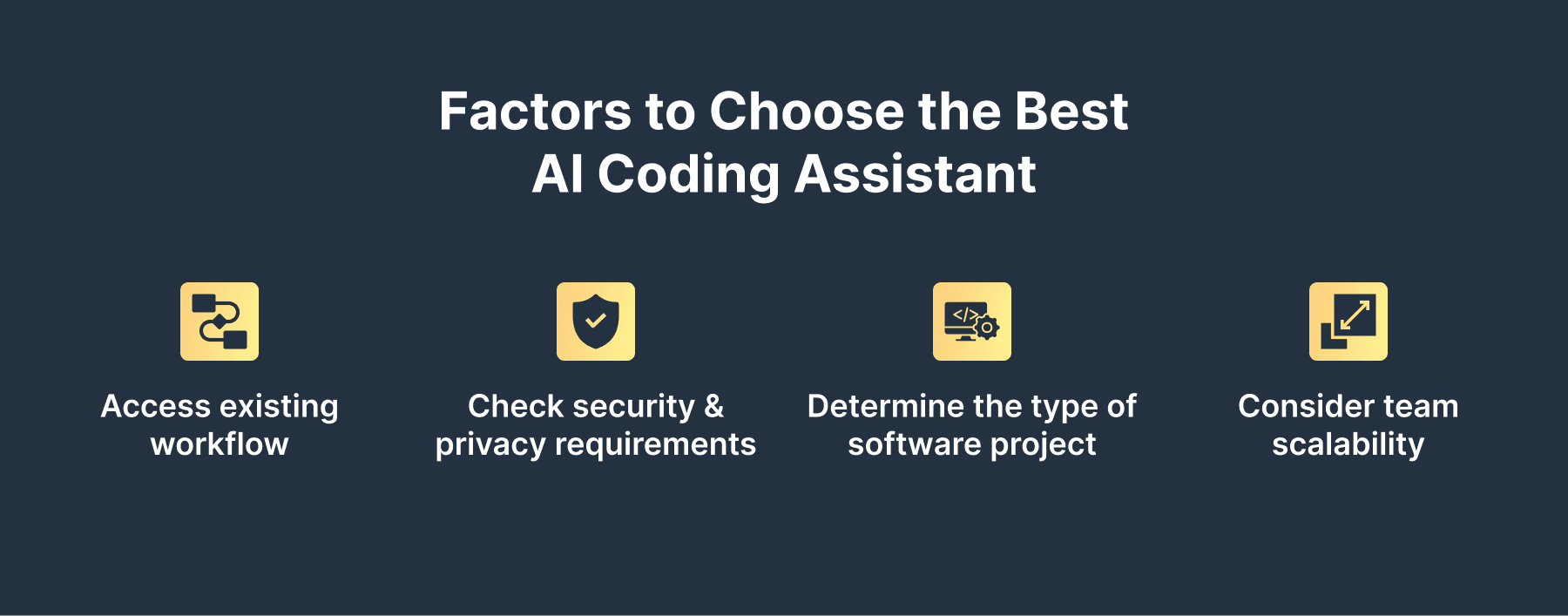
AI coding tools are equally part of startup technology trends, as well as broader SMB and enterprise trends. Selecting the best AI for coding isn't just about picking the tool with the highest benchmark scores. It requires a thoughtful comparison of AI coding assistants based on your team's unique constraints.
1. Assess Your Existing Workflow
If your team is religiously attached to JetBrains IDEs (IntelliJ, PyCharm), Cursor (VS Code-based) might be a hard sell. In this case, Copilot or Tabnine are better fits. If you’re already using VS Code, moving to Cursor is very easy.
2. Security and Privacy Requirements
For startups in regulated industries, an AI-powered coding assistant review must prioritize data handling. For example, Tabnine and Copilot Enterprise offer zero-retention policies and IP indemnification. Ensure the tool you choose allows you to opt out of data training.
3. Vibe Coding vs. Full-Scale Engineering
Are you prototyping an MVP or maintaining a legacy monolith? An AI coding model comparison often shows that lighter models are faster for simple prototypes. Nevertheless, you need heavy-hitters like Claude 3.5 Sonnet (available in Cursor and Claude) for maintainable, complex engineering tasks.
4. Team Scalability
Consider how the tool handles team-based context. The best AI coding assistant for a solo founder might be different from one for a team of 20. Tools that allow you to share "rules" ensure that the AI adheres to your team's specific coding standards. This is vital for consistency.
Limitations and Risks of AI Coding Tools
No AI coding assistants comparison is complete without addressing the risks. While these are the top AI coding assistants, they are not senior engineers and can’t replace years of expertise.
- Scalability limitations. AI often generates code that works for now but fails to account for 10x scale. It might suggest a nested loop where a hash map is needed, which only becomes a problem when your user base grows.
- Technical debt and "Spaghetti Code". The ease of generating code can lead to bloating. Junior developers might generate massive blocks of code they don't understand, leading to a codebase that is impossible to debug.
- Review fatigue. With quick AI code generation, the volume of code needing review increases. Senior engineers can get overwhelmed, leading to a "rubber stamp" culture where AI code is merged without proper scrutiny.
- Dependency risks. Relying entirely on an AI-powered coding assistant workflow can atrophy the fundamental skills of junior developers. They must learn to code without the AI to truly understand what the AI is doing.
- Pricing volatility. As we see in any AI coding model comparison, API costs and subscription models change rapidly. A tool that is cheap today might double in price as VC subsidies dry up.
Read also: How to Make Your Vibe‑Coded App Secure and Scalable
Speed Up Your Software Development with Seedium’s AI-assisted Approach
At Seedium, we have efficiency as one of our core values. We choose the most appropriate tools for every project, including AI automation solutions. Our approach combines the raw speed of AI-powered coding assistants with the architectural rigor of seasoned engineering experts.
With this smart approach, we can refactor a legacy application, optimize your infrastructure, build a complex product from scratch, and more. Feel free to check out our AI-augmented development services to learn how we can speed up your software development workflow and deliver value to your business faster.


