


- Choosing the right tenancy model is a crucial factor in designing a multi-tenant architecture that balances cost, performance, customization, and security.
- Robust authentication/authorization and carefully designed multi‑tenant databases are essential to protect tenant data and ensure performance.
- SaaS architecture best practices include ensuring strong tenant isolation, implementing robust tenant-aware security, and building observability and monitoring into the system from the start.
Building scalable SaaS applications is no easy feat, especially if they must securely support multiple customers (tenants) on a shared platform. Having almost a decade of experience in SaaS product development, we understand the common pitfalls that tech leaders face on this journey.
In this article, we'll explore the trade-offs between single-tenant and multi-tenant architectures, guide you through designing efficient multi-tenant SaaS applications, and conclude with best practices for effective multi-tenant architecture.
Multi-tenant vs. Single-tenant SaaS: Strategic Trade-offs
When building a SaaS application, choosing a tenant strategy is critical because it determines how easily the application can scale and how much customization you can offer each customer. Each model involves cost, security, customization, and scalability trade-offs.
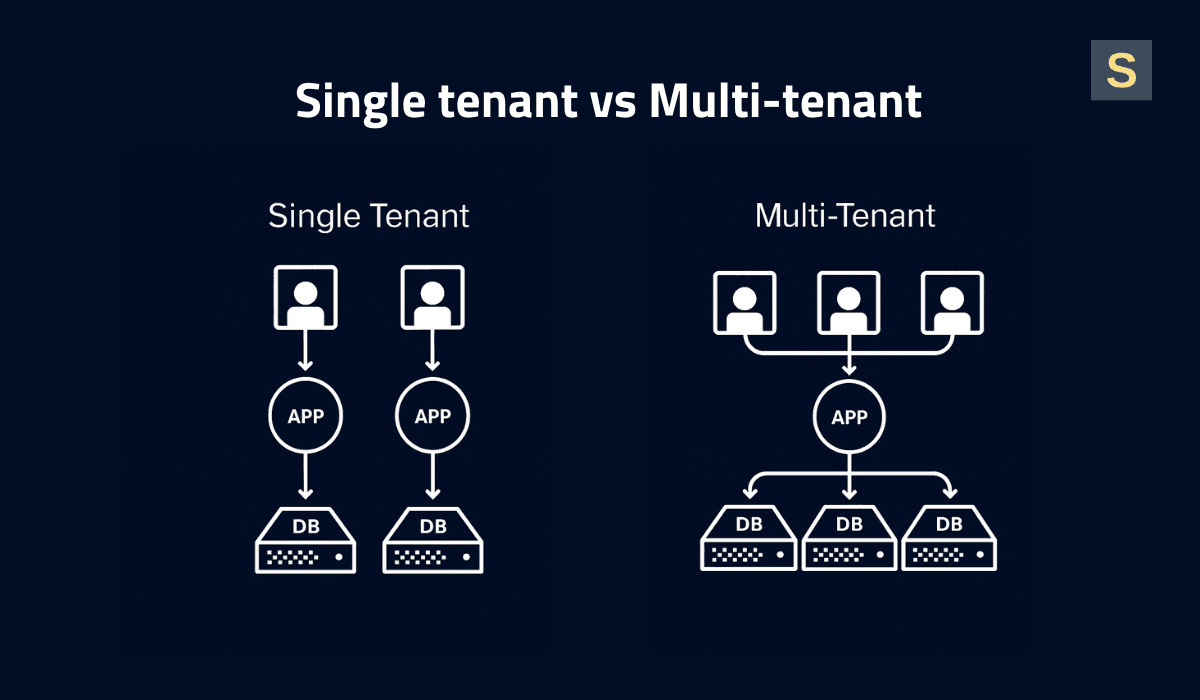
Single-Tenant Architecture
In this model, each tenant operates in an isolated environment, like every client has their own house. This setup provides maximum data isolation and security, and allows for deep customizations per client since changes only impact their instance.
However, single-tenancy is costly and more challenging to scale. With dedicated resources per tenant, infrastructure costs increase linearly with each customer. Onboarding new clients means setting up new servers or containers, which raises complexity and deployment time. Additionally, the maintenance workload grows: updates or patches must be executed on every instance, which hampers release cycles.
Single-tenant architecture is a good solution for enterprises with strict security and compliance. Let's say you build HRM software for a large corporation that requires dedicated infrastructure, tightly controlled data access, and the ability to customize workflows.
Multi-Tenant Architecture
Multiple tenants coexist within a shared application and database, with logical segregation (typically a tenant ID column or isolated schema) ensuring the confidentiality of each tenant's data.
Multi-tenancy is highly cost-efficient and scalable. Resources are pooled, so you’re not running 100 separate servers for 100 customers. Instead, a shared cluster handles all tenants. New customers can be onboarded swiftly using the existing infrastructure, without complex setup. Maintenance is simpler, too, since there is a single codebase and deployment. Bug fixes and patches have to be applied once to accommodate each tenant.
However, multi-tenancy introduces design complexity and necessitates robust security controls. Performance may also be a challenge due to shared resources. This can cause a noisy neighbor problem, where one tenant consumes too many resources and affects others. To prevent this, you need to use resource management strategies such as load balancing, query limits, and throttling to keep the system fair.
Hybrid Methods
There are also hybrid approaches that combine the best of both worlds. For example, you might serve most customers within a shared multi-tenant environment, but provide dedicated instances for enterprise customers that need more security or performance guarantees.
This vertical partitioning model allows you to achieve cost savings for most tenants while isolating only those who require it. Additionally, you can charge a premium for a single-tenant deployment option.
The trade-off is increased complexity. Your codebase must support both multi-tenant and single-tenant modes in parallel. You’ll also need clear processes to migrate a customer from the shared environment to a dedicated one (and vice versa) if their needs change.
Aside from the added complexity, hybrid architectures are common for SaaS providers serving large enterprises and SMBs, or for offering tiered plans.
Building a Multi-tenant SaaS Architecture: 7 Key Steps
Most companies start off with a simple multi-tenant SaaS architecture and then evolve it as the tenant count goes up and requirements get harder to fulfill. Here’s a step-by-step overview of how we do it at Seedium.
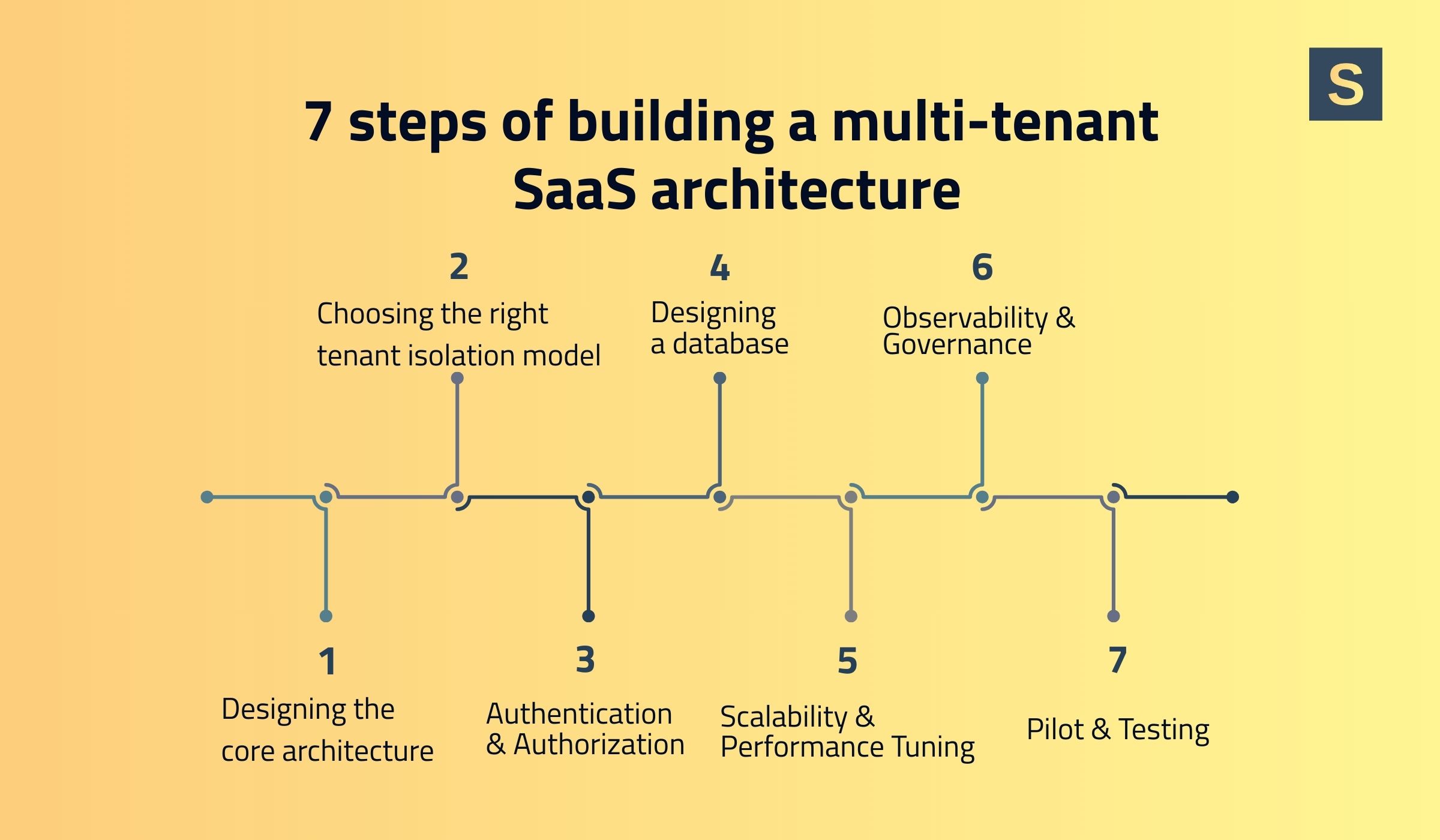
1. Design the Core Architecture Layer
The choice between monolithic vs microservice architectures is not straightforward. Microservices are often considered the most agile solution, but they are rarely needed from day one. In reality, for 99% of early-stage products, a properly architected monolith is optimal for simplicity and speed.
Monolithic architectures are simpler to develop and deploy initially, and can certainly handle high load if you scale them using best practices. Many SaaS platforms support millions of users on a monolith.
Microservices are helpful as you scale or develop some parts of the system independently. However, they increase complexity in orchestration and require a mature DevOps culture to cope with.
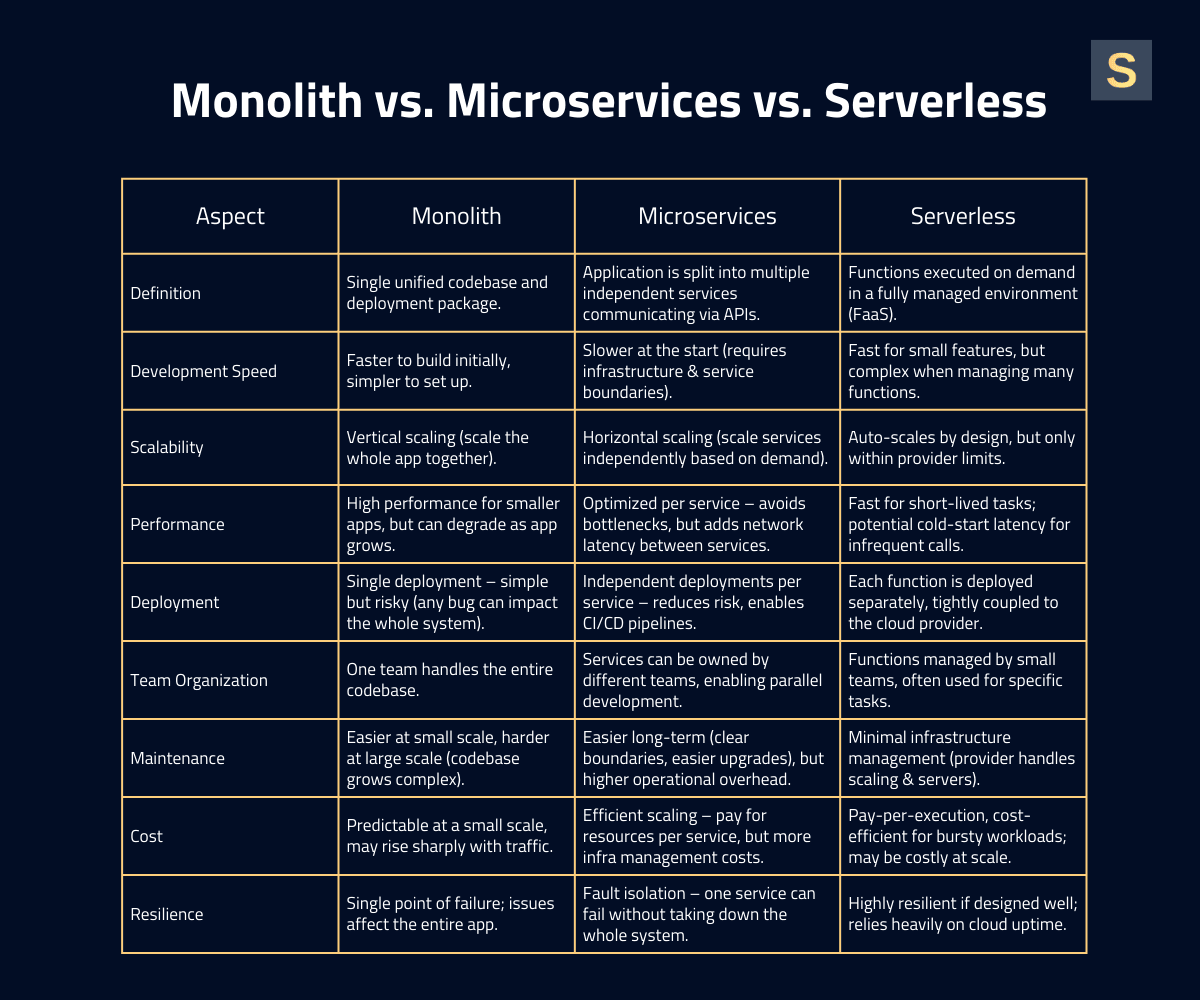
We recommend starting with a monolithic or modular monolith to launch your product faster, then extract microservices for specific components as bottlenecks or organizational needs arise. On top of this, consider containerization (Docker/Kubernetes) or serverless functions for certain services.
For example, your core app could run as a containerized service, while serverless AWS Lambda functions handle isolated tasks such as image processing. This approach improves scalability and cost-efficiency for variable workloads.
Also, choose your cloud infrastructure carefully. Most SaaS providers use a public cloud like AWS, Google Cloud, or Azure in order to use on-demand scale and managed services. Each cloud provider is adept at something. For example, AWS boasts an astronomical number of services and regions. See our AWS vs. Google Cloud for business guide for a complete comparison.
2. Choose the Right Tenant Isolation Model
Tenant isolation models define how you separate one tenant’s data and resources from another. This affects security, scalability, cost, and customization. There are several types to choose from:
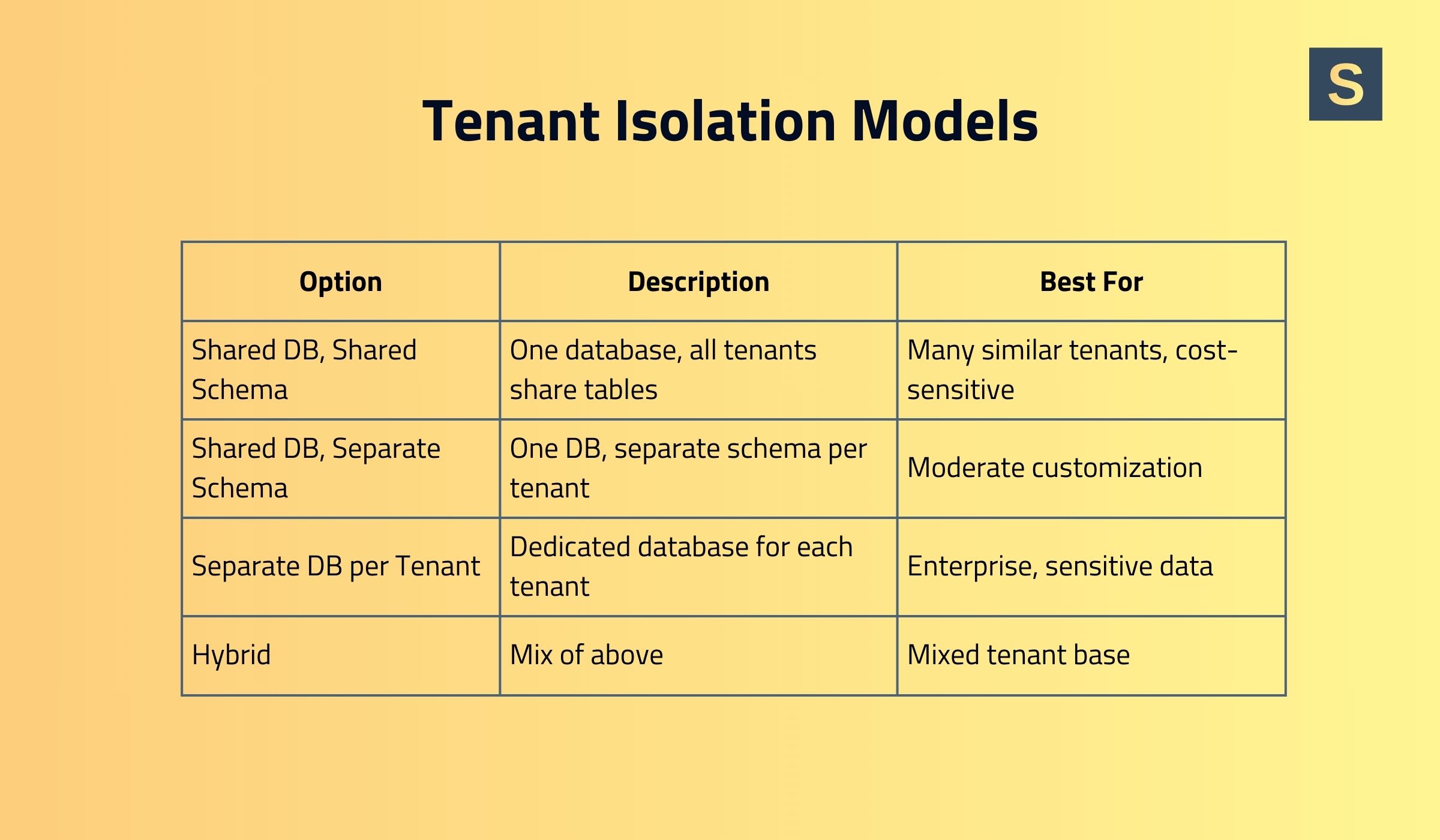
- Separate Database per Tenant. Each tenant has an independent database (or cluster), providing maximum isolation and security. However, this approach is resource-intensive and difficult to scale. As the system grows, it leads to infrastructure sprawl, duplicated resources, and complex management of many separate databases.
This model is feasible when serving only a few large tenants (e.g., 10 enterprise customers), but not thousands.
- Shared Database, Shared Schema. All of the tenants' data resides in the same database tables, separated by a tenant ID column. This approach is simple and cost-efficient, and it offers strong baseline scalability because the system manages only a single set of tables. However, it provides limited customization per tenant and carries a higher risk of accidental data exposure if queries do not strictly enforce tenant filtering.
This model works well for products with many tenants that have similar requirements, such as collaboration applications.
- Shared Database, Individual Schemas. Multiple tenants share the same database instance, yet each tenant has its own schema (collection of tables within the database). This gives a moderate isolation level and allows for some customization, as one tenant's schema might include an additional table or slightly different indexes.
Even though this model needs complex schema management, it’s a good option for medium-scale SaaS apps requiring tenant-specific features, such as accounting software, CRM systems for small-to-medium businesses, or HR platforms.
- Hybrid. A mixed approach in which some tenants share databases while others have separate ones. For example, a database can be shared until it reaches X GB or Y tenants, after which data is sharded across multiple databases. Heavier-resource tenants can migrate to dedicated databases, while lighter tenants continue sharing.
Your choice should balance security, compliance, performance, and cost. For instance, a small B2B SaaS with dozens of similar customers may use a shared database with tenant IDs (cost-effective and simple), while a SaaS serving a few large enterprises that handle sensitive data may opt for a database-per-tenant for maximum isolation.
3. Use Robust Authentication & Authorization
Most SaaS platforms use an organization-based authentication model. Using Auth0 or another identity provider (IdP), each tenant can be represented as an organization, with users belonging to one or more organizations.
When it comes to security, Role-Based Access Control (RBAC) is the obvious access control mechanism to begin. Define roles (Admin, Editor, Viewer) scoped per-tenant, so one user can be an Admin in Tenant A but maybe only a Viewer in Tenant B.
Your multi-tenant SaaS application should always enforce context: when a logged-in user makes a request, the system must ask "Does user X have permission Y in tenant Z? " before granting access. This prevents cross-tenant access even where multiple tenants have accounts.
As your SaaS grows, a future extension to Attribute-Based Access Control (ABAC) or relationship-based patterns may be required for finer granularity. Still, the basic principle is the same: each permission check is made with the tenant identifier.
Enterprise customers will also need features such as Single Sign-On (SSO) integration and possibly SCIM provisioning.
4. Design Data Isolation
At this stage, you plan how the chosen tenant isolation strategy will work in practice. This includes:
- Implementing tenant separation based on the chosen model
- Enforcing access controls such as authentication, row-level security, and other mechanisms to prevent cross-tenant access
- Defining backup and restore strategies for tenants
- Planning schema updates and migrations
- Optimizing queries and indexing per tenant to maintain performance
- Ensure tenant filtering is applied consistently
Proper design here is critical for security, compliance, and scalability. Mistakes at this stage can lead to data leaks, slow queries, and operational headaches later.
5. Enable Scalability & Performance Tuning
To handle growing user volumes without system collapse, you need to build scalability into your infrastructure and software. This involves both auto-scaling and performance tuning:
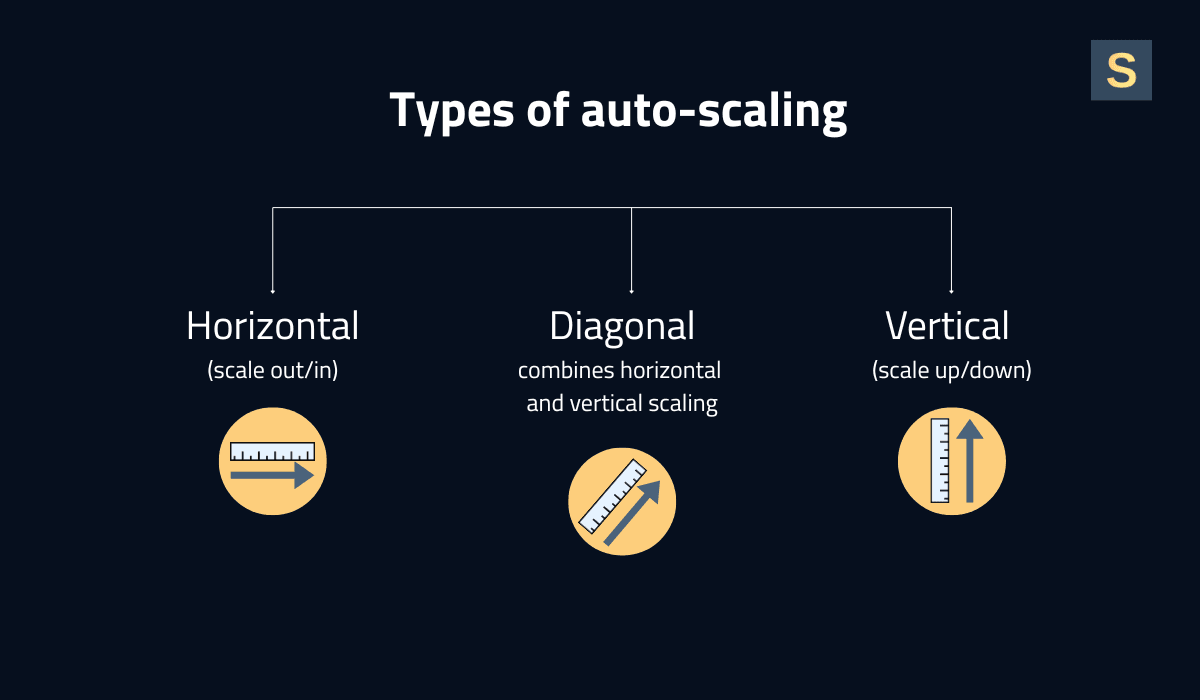
Auto-Scaling Infrastructure. Use cloud features to auto-scale out as load increases. For instance, in the case of containerized workloads on Kubernetes or ECS, use Horizontal Pod Autoscalers (HPA) to raise the number of pods when CPU or latency is over a certain threshold. With VM-based deployments, use auto-scaling groups to create more instances at high load. Serverless components will scale by themselves on demand, but keep their limits under control.
Load Balancing & Tenant-Aware Routing. Put good load balancers in front of your services so that incoming requests get forwarded. In a multi-tenant setup, you might employ tenant-aware routing optimizations. For instance, route all requests for Tenant X to the same set of servers for cache locality, or restrict a VIP customer's traffic to an isolated node.
Caching and CDN. Caching is critical for performance. Use in-memory caches (e.g., Redis or Memcached) to store frequently accessed data or computationally expensive query results per tenant. For instance, store tenant-specific configurations or analytics query results so subsequent users from the same organization receive faster responses. Employ a Content Delivery Network (CDN) to cache static assets and, where possible, dynamic responses at the edge.
Continuously monitor application performance metrics (latency, throughput, error rates) and break them down by tenant. This will help you pinpoint if a particular tenant is experiencing slowness. It also helps demonstrate to your customers that you meet your performance SLAs.
We recommend you read our article on the key principles of scalable software architecture.
6. Add Observability & Governance for All Tenants
With your SaaS expanding to dozens or hundreds of tenants, the ability to observe what's happening and be in control becomes a must. Observability means having the right monitoring, logging, and tracing, while governance means being in charge of usage, compliance, and security on a per-tenant level.
You will need the following mechanisms:
-
Per-Tenant Monitoring. Monitoring the system as a whole is not enough; you must instrument your app to measure per-tenant metrics. This can include tagging application metrics and logs with a tenant ID. As an example, monitor the volume of requests each tenant gets, their error rate, page load time, database query times by tenant, etc. With that data, you can create internal dashboards showing each tenant's experience health.
-
Centralized Logging & Auditing. Implement a centralized logging system that collects logs across your multi-tenant SaaS architecture, including tenant context in each entry. This allows filtering by tenant activity and enables rapid debugging when a tenant reports an issue.
-
Tenant Analytics & Usage Dashboards. Create internal dashboards that give your staff an overview of usage for each tenant: active users, API calls, storage consumed, etc. This helps with capacity planning (you can sometimes tell that one customer is going to need a dedicated node), as well as business decisions (identifying power consumers vs. low usage customers).
-
FinOps and Chargeback. For overage or usage-based pricing, accurate per-tenant metering should feed into your billing system. Even without such pricing, it is advisable to maintain internal chargeback accounting, mapping cloud spending to individual tenants.
Treat observability and governance as first-class features of your SaaS. Day one, instrument your multi-tenant SaaS application with monitoring hooks and establish security baselines. It's far easier to build this up front than to retrofit auditing and metering after you've achieved 100 customers.
7. Pilot Projects and Scale Test
Experiment with opening up with a pilot group of tenants or a beta environment and test against actual conditions. For example, on-board 2-3 nice customers onto the new system and observe everything closely. This enables you to make sure tenant onboarding workflows are working properly, your authentication model can cope with all scenarios, and performance is reasonable under load.
When building scalable architecture, implement an incremental rollout strategy. Once your multi-tenant SaaS architecture is stable, gradually onboard additional tenants or expand marketing efforts to attract new customers.
Best Practices for Creating Scalable SaaS Architectures
Here are some SaaS multi-tenant architecture best practices to help you develop your product.
1. Start Small, But Scale-Friendly Design
Avoid over-engineering your architecture at the start. You most likely don’t need 50 microservices for the MVP. Instead, build a clean, rock-solid foundation with a properly defined scaling roadmap. For example, a monolith is fine to start with if you modularize your code and put boundaries in place so that it can be split into services later.
2. Think About Tenant-Based Resource Isolation
The “noisy neighbor” problem is real, as usage patterns may vary significantly across tenants. For example, one corporate customer may run heavy reports that consume large amounts of CPU and memory, slowing down other tenants sharing the same resources. Tenant-based resource isolation ensures predictable performance and fair usage.
Isolation can be implemented by limiting each tenant’s usage of system resources. For example, restricting API calls or messaging queue consumption, enforcing per-tenant disk quotas, and capping database connections in shared environments.
3. Automate Tenant Lifecycle Management
As your tenant base grows, manual processes become insufficient. Automate the entire tenant lifecycle, including provisioning, configuration, monitoring, and deprovisioning. This may involve an automated script or service that executes when a new customer signs up. It sets up their tenant account, provisions any isolated resources they might need, and configures default settings.
For future management, automate the following tasks: certificate renewals on custom domains, scaling changes to a tenant's partition, or tenant migration to a different shard.
4. Test, Monitor, and Continuously Improve
Load-test your multi-tenant SaaS application regularly, especially before major releases or marketing pushes, to ensure that you can handle expected growth. Constantly monitor system metrics and user traffic to catch emergent bottlenecks before they cause outages. Incorporate a practice of chaos engineering or at least failure injection into staging to guarantee resiliency.
5. Plan for AI in Advance
With dozens of AI use cases for SaaS, businesses can build more efficient products that deliver clear competitive advantages. Even if you plan to integrate AI into your SaaS later, designing an architecture that can support it from the start is a smart long-term decision.
This includes planning for scalable data storage, modular service design, strong API communication, robust security, and enough compute capacity to handle future machine learning workloads.
Case Studies for Building Multi-Tenant SaaS Architectures
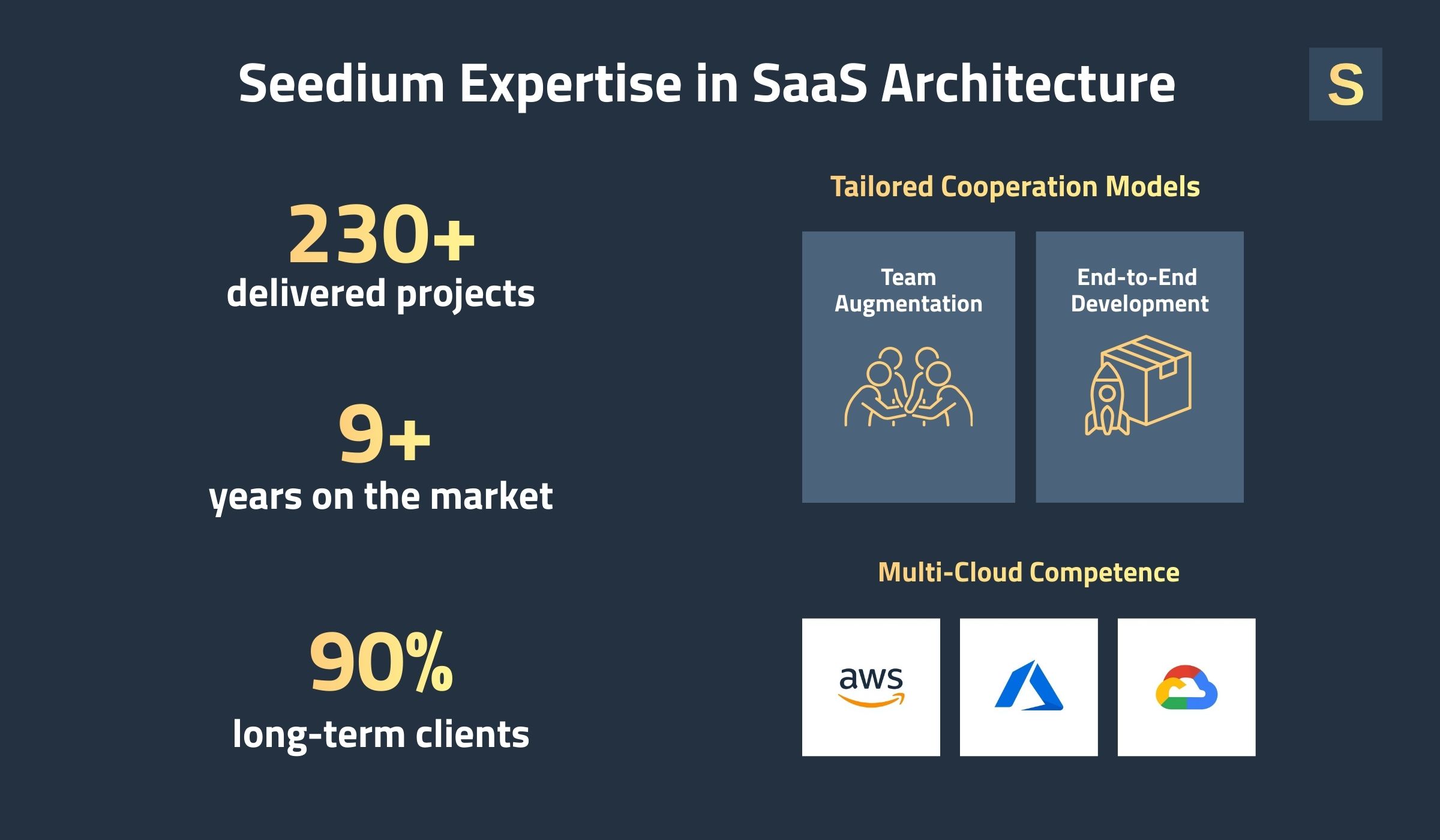
At Seedium, we’ve been helping businesses build and scale SaaS platforms since 2017. During this time, our team formed extensive expertise in designing efficient multi-tenant architectures across industries. Here are some projects we worked on.
Communication Platform for Real Estate
We helped the client transition from a monolithic architecture to a microservices-based architecture. This improved scalability enabled the product team to develop, deploy, and scale services independently.
The updated architecture also enhanced fault isolation, simplified maintenance, and laid the foundation for faster feature delivery and future growth. Today, the platform serves over 5,000 users worldwide.
Read the full case study here >>
Online Proofing Platform for Creatives
The app required a highly stable architecture that could support fast image uploads and downloads without compromising full resolution. To achieve this, we used AWS Lambda with Kafka to enable a fast, flexible, and scalable processing system.
As a result, users can efficiently upload and download media, organize it into galleries, and collaborate seamlessly. The platform now serves over 5,000 active users each month.
Read the full case study here >>
Recruitment Marketing SaaS Platform
The client hired us to build a unique recruitment platform that integrates hiring with video job ad features. We implemented a microservices-based architecture using Node.js and NPM to ensure scalability, flexibility, and efficient tenant-aware data management.
Features such as horizontal auto-scaling, isolated service modules, and a scalable backend were designed to support multiple tenants and a growing number of users.
Read the full case study here >>
Build and Scale Your SaaS Product with Seedium
At Seedium, we build SaaS products designed for scale, security, and success. Our senior back-end engineers will help you create an architecture that handles thousands of tenants with predictable performance. We work with horizontal scaling, microservices, auto-scaling strategies, and key cloud technologies to provide solutions that meet your unique needs.
With the right development partner, you can serve every new customer that comes on board without missing a beat. Feel free to check out our SaaS app development services or contact us via the form below to get a project estimate.


