


Optimized for speed, AI and no-code tools can help you vibe code a prototype in days. The challenge is taking it to production, where it must remain reliable under real-world conditions. This requires a scalable architecture and secure infrastructure with proper testing and observability in place.
In this article, we’re sharing our experience migrating vibe-coded apps to back-end infrastructure using AWS as an example. Find a step-by-step guide to help you transition to production without any bottlenecks.
1. Define Your Database Structure
Before doing any migrations, you should map out how your data translates into production-grade storage and schemas in AWS. For example:
Users table → RDS (PostgreSQL)
Cache → Redis
Images → S3
Vibe-coded apps often have mixed logic and inconsistent data formats. So you might need to normalize data by defining entities and relationships and removing implicit structure from code. This will add clarity and structure to your database.
Also, don’t forget about security and access control at this stage. Use IAM roles, encryption (at rest + in transit), and access policies.
2. List Production Requirements
Deciding on the key aspects of your system helps you to choose the right services and make the right configurations. Here are some metrics you need to consider:
- Scalability: How many users, expected load spikes
- Availability: SLA (Service Level Agreement) and SLO (Service Level Objective) targets
- Security: Data sensitivity, compliance needs (e.g., GDPR, HIPAA, SOC 2)
- Observability: Logging, metrics, monitoring A clear understanding of these factors reduces technical debt, improves reliability, and ensures your architecture can evolve with your product.
3. Choose Your Back-End Architecture
Choosing architecture is the step where you decide how your application will be structured, run, and scaled in AWS.
At this stage, you decide on the overall architecture style, such as a monolith or microservices, serverless, or an event-driven approach. Each option has trade-offs: a monolith is simpler to build and deploy, while microservices and event-driven systems are more scalable and flexible but introduce additional complexity.
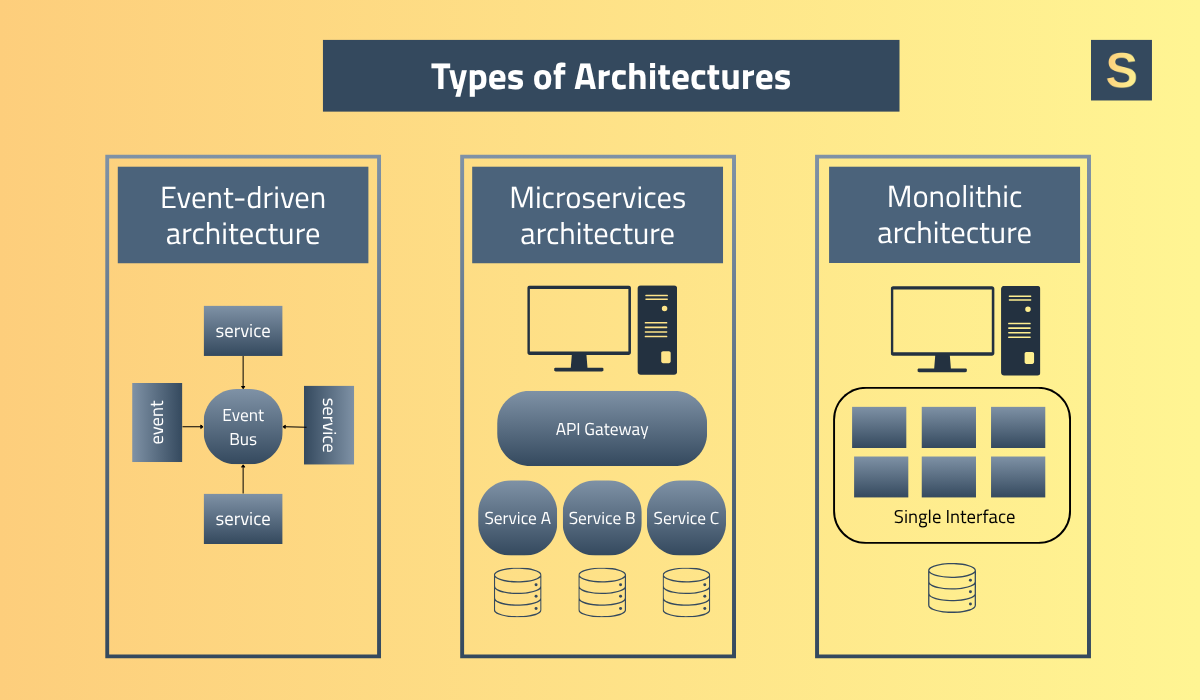
For many modern AWS setups, teams often choose serverless or container-based architectures to balance scalability and operational overhead.
Another key part of architecture is defining how components communicate with each other. This includes choosing between synchronous communication (like REST APIs) and asynchronous patterns (such as queues and events using services like SQS or SNS).
4. Set Up Your AWS Environment
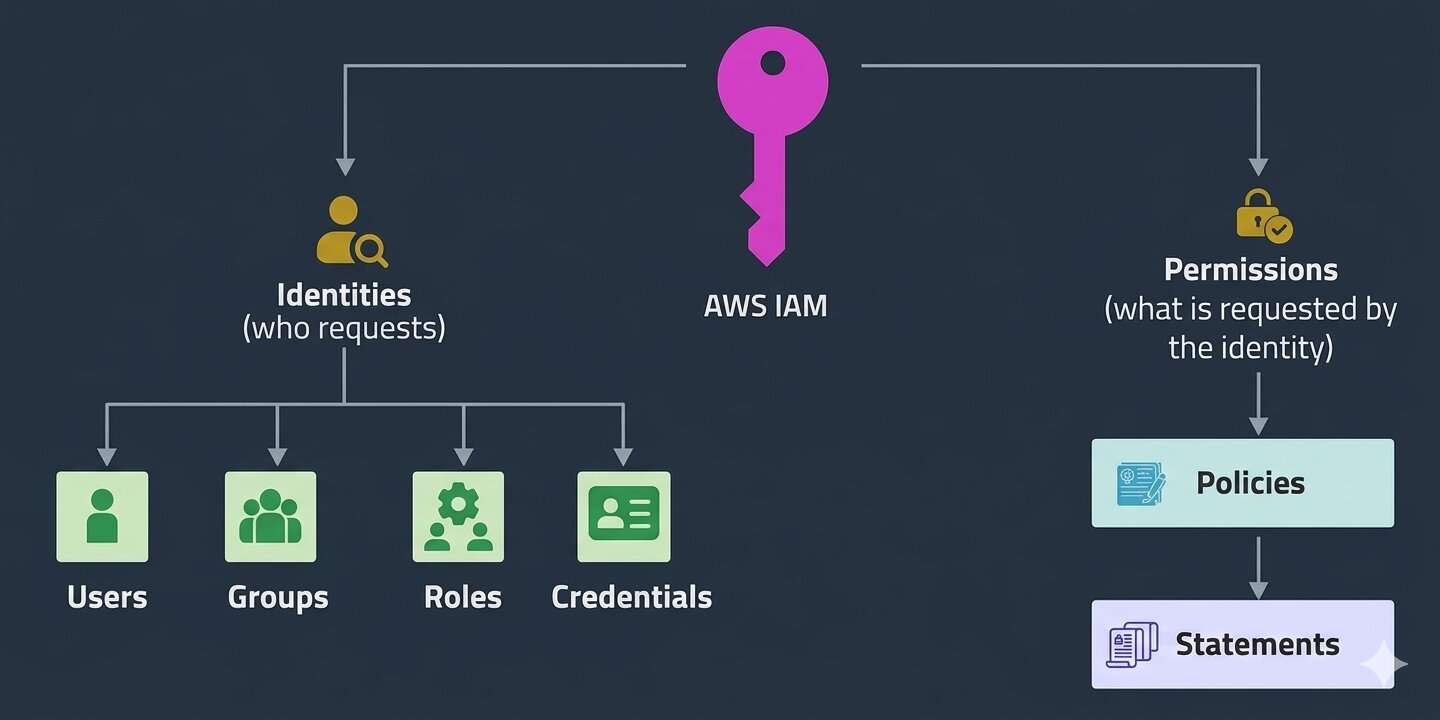
The best practice is to create separate environments for development, staging, and production. This ensures that experimentation, testing, and real user traffic are isolated from each other. Next, configure IAM (Identity and Access Management) roles and permissions. This is a critical security layer that controls who can access what within your AWS environment. This typically includes roles for developers, CI/CD pipelines, and application services, and assigns precise permissions to resources like databases, storage, and compute services. Proper IAM setup helps prevent accidental changes and protects sensitive data. Applying the principle of least privilege here is essential for maintaining a secure environment.
Finally, you set up billing alerts and budgets to monitor and control costs. AWS usage can scale quickly, so it’s important to track spending from the start.
5. Refactor Your App
Vibe-coded apps are often built without a strict structure. So you’ll need to clean up the codebase by introducing clear patterns, separating concerns, and improving maintainability.
Here are some of the most important improvements:
-
Proper error handling and logging. Each request and error should be tracked, ideally with context such as user ID, request ID, and timestamps. This makes it much easier to debug issues and monitor system behavior.
-
Making services stateless. Your app shouldn’t rely on local memory or disk to store important data between requests. Instead, all state should be stored in external systems like databases or object storage (for example, S3 or DynamoDB).
-
Securing database connections. Use connection pooling to reuse existing connections instead of creating new ones for every request. Additionally, database credentials and connection strings should be stored securely rather than hardcoded in your application.
It’s crucial to understand that attempting to refactor an entire system at once introduces significant risk. Refactoring should be performed incrementally, allowing each change to be tested and validated before moving forward.
Before starting any refactoring, we strongly recommend establishing a solid test foundation. At a minimum, unit tests should be implemented, with coverage focused on critical server-side logic. This ensures that changes don’t introduce regressions.
6. Containerize Your App (If Needed)
Containerizing your app helps standardize how it runs across different environments. In most cases, this is done using Docker. However, containerization is not always required. It becomes necessary when deploying to platforms like AWS ECS or AWS EKS (Kubernetes), where containers are the core unit of deployment.
If you’re using a serverless architecture such as AWS Lambda, containers are typically not needed, as AWS manages the underlying infrastructure for you.
In practice, if your app is simple and serverless already meets your needs, it’s often better to skip containerization to make the system easier to manage.
7. Configure Networking & Security
Security settings involve both defining how your system communicates internally and how it is protected from external threats. The foundation of this setup is the Virtual Private Cloud (VPC), which acts as an isolated network environment for your resources.
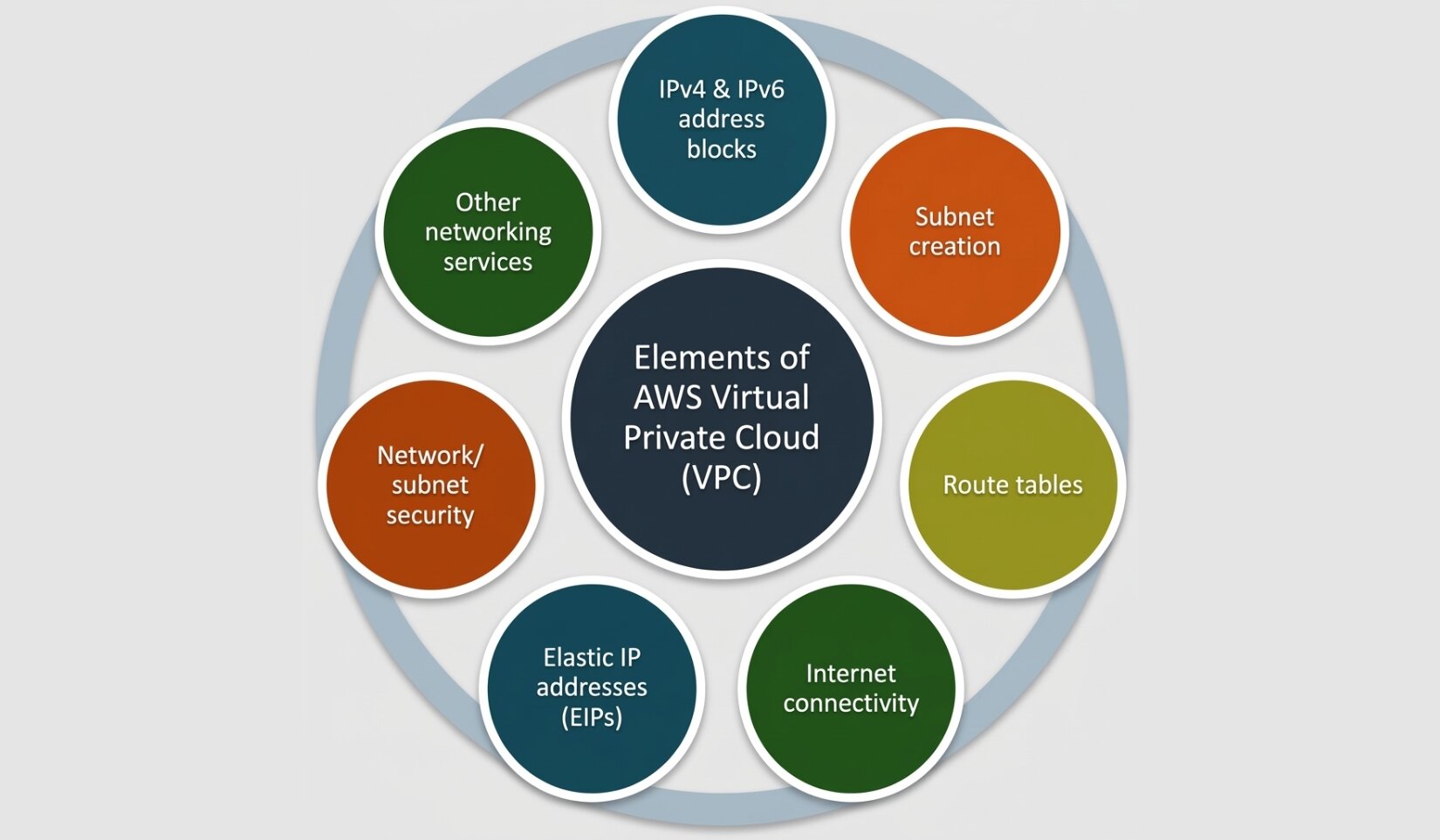 A key best practice is to place your databases in private subnets, ensuring they are not directly accessible from the Internet. Instead, they can only be accessed by internal services within the VPC, significantly reducing the attack surface.
Finally, you should enable secure communication across your system by configuring HTTPS using AWS Certificate Manager (ACM). Certificates from ACM can be attached to services like CloudFront (CDN) or an Application Load Balancer (ALB), ensuring that all traffic between users and your application is encrypted.
8. Implement CI/CD
Continuous Integration and Continuous Deployment turn your deployment process from a manual task into an automated pipeline.
What you need to do is to connect your code repository (for example, GitHub) to a CI/CD system such as AWS CodePipeline or GitHub Actions. Once connected, you automate the build process. This step compiles your code, installs dependencies, and prepares artifacts.
Next, you integrate automated testing into the pipeline. This includes:
- Unit tests to validate individual components
- Integration tests to verify how different parts of the system work together This way, you’ll be able to catch bugs early and prevent broken code from reaching production.
9. Set up Observability
The foundation of observability consists of three key pillars: logging, metrics, and tracing.
- Logging captures detailed records of events and errors within your application.
- Metrics provide insights into system performance, such as CPU usage, memory consumption, request latency, and error rates.
- Tracing tracks how a single request flows through different services, helping you identify bottlenecks or failures across the system.
In AWS, you can use Amazon CloudWatch as the central place to collect logs and metrics. CloudWatch allows you to aggregate logs from different services, visualize metrics, and create custom dashboards to monitor system health.
10. Test and Deploy to Production
Never neglect testing before going live. Run unit and integration tests to ensure your core logic works correctly, followed by load and performance tests to verify the system can handle real-world traffic and scale under pressure.
Once everything is verified, perform data migration using an ETL process. This includes extracting data from your existing system, transforming it to match your new schema, and loading it into your production databases while validating integrity.
Deploy using safe strategies like blue/green or canary releases. This way, you can gradually roll out changes and minimize risk by allowing quick rollback if issues arise.
Test your vibe-coded app for scalability in 5 minutes. Find weak areas that need improvement and advise on how to do it right. Take the test.
Case Study: Moving a Vibe-Coded App to AWS
The client came to us with a micro-SaaS application developed using AI tools. While the app functioned locally, the client aimed to move to a production-grade infrastructure to support and scale a growing user base. As the startup didn’t have an in-house tech team, they partnered with Seedium to ensure a reliable migration to AWS and to improve the overall stability, scalability, and performance of the application.
Our solutions:
- Conducted a comprehensive code audit and established architecture and coding standards
- Separated configuration from code to enable the same code to run across different environments (development, staging, production)
- Defined clear service boundaries (e.g., frontend, backend, payment services) to improve modularity and maintainability
- Ensured compliance and security requirements were properly implemented
- Adopted Infrastructure as Code (e.g., Terraform, AWS CloudFormation) for consistent and repeatable deployments
- Ensured environment parity between local, staging, and production environments using tools like Docker
- Implemented logging, monitoring, and alerting before scaling to production
- Gradually refactored application components into stable modules, achieving approximately 80% unit test coverage for critical server-side processes
Outcomes:
- As a result of the 3-month collaboration, we successfully achieved the key project objectives and enabled the client to launch the product in production:
- Refactored approximately 60% of the codebase, improving structure and maintainability
- Reduced production incidents by ~60% thanks to improved system stability and a well-defined architecture
- Decreased deployment time by ~50% through the adoption of Infrastructure as Code and automated deployment processes
- Improved system performance by ~30% through targeted refactoring and optimization
Migration to other cloud infrastructures follows a similar approach, but each platform differs in tooling, configuration management, networking, security models, and deployment processes.
You can explore another project we completed involving migration to Google Cloud here.
6 Mistakes to Avoid When Turning Vibe Coding to Production
Now, let’s talk about the common mistakes when migrating a vibe-coded app to production.
1. Lack of clearly documented project fundamentals
Vibe-coded apps often lack structure. If you don’t document core information, coding standards, and examples, developers (and AI tools) may produce inconsistent or incorrect code in future features.
How to avoid it:
- Document core project concepts, architecture, and conventions
- Define coding standards with clear examples
- Keep guidelines easily accessible and up to date
- Align AI-assisted development with project rules via templates, prompts, or linting tools
2. Front-end dependency on back-end internals
When the front-end directly relies on backend implementation details (e.g., database structure, internal logic, or specific response formats), this creates a fragile system where any backend change can break the frontend.
How to avoid it:
- Define a clear API contract (frontend only talks via APIs)
- Keep backend logic private and expose only what is necessary
- Use versioned APIs to safely evolve changes
3. No API versioning
Lack of API versioning can break existing clients by forcing simultaneous updates across all users. Without versioning, you also lose the ability to safely roll back to a stable version when issues arise.
How to avoid it:
- Introduce versioning early
- Maintain backward compatibility for older versions
- Deprecate old versions gradually
4. Skipping auth design early
Adding authentication and authorization later creates security vulnerabilities and leads to inconsistent access control.
How to avoid it:
- Define auth strategy from the start
- Implement role-based access control (RBAC)
- Use centralized identity providers (e.g., Auth0, AWS Cognito)
- Secure APIs from the beginning, not as an afterthought
5. Weak or missing secrets management
When API keys, passwords, and tokens are hardcoded or stored insecurely, this causes risks and potential data leaks.
How to avoid:
- Use secret managers (e.g., AWS Secrets Manager, Parameter Store)
- Never hardcode secrets
- Rotate credentials regularly
6. No monitoring of costs
If infrastructure usage is not tracked or controlled, this leads to unexpected AWS bills and inefficient resource usage.
How to avoid:
- Set up budgets and alerts
- Monitor resource utilization
- Right-size services regularly Consider all the above in your migration strategy to avoid bottlenecks and successfully move your app to production infrastructure.
Need Help in Making Your App Production-Ready?
Seedium has been in software development since 2019. In recent years, we have been actively following the development of AI and building in-house expertise to help startups turn their vibe-coded apps into market-ready products with optimized budgets and minimal rework.
Our smart app scaling approach is based on three pillars:
- Strengthen the current foundation of your app.
- Fix what doesn’t work properly.
- Scale for reliability and growth.
With a team of experienced front-end and back-end engineers, we can help you secure and scale your vibe-coded application following industry best practices.
Feel free to check out our startup software development services or contact us using the form below to start a conversation about your project!


